I Built a Memory Layer for My AI Agent
You open a new session with your AI coding assistant. You type a question about a service you touched three weeks ago. It has no idea what you're talking about. So you spend ten minutes re-explaining the architecture, the deployment pattern, the ticket you were working on, why the last PR got blocked, and what decisions were made in a Slack thread that's now buried under 400 messages.
Then you do it again tomorrow. And the day after.
I got tired of this. So I built a system where my AI assistant starts every session knowing exactly where I left off — what I was working on, what decisions were made, which PRs are open, and how every service in my team's platform connects to every other service. No re-explaining. No archaeology. No wasted tokens on context I've already provided.
After two months of iteration, the system maintains a knowledge graph with 770+ edges across 20 services and 1,100+ tickets. It enriched 277 historical tickets with decisions and outcomes by cross-referencing git history with project management comments — in 15 minutes, with zero manual work.
Here's how it works, why it matters, and what I learned building it.
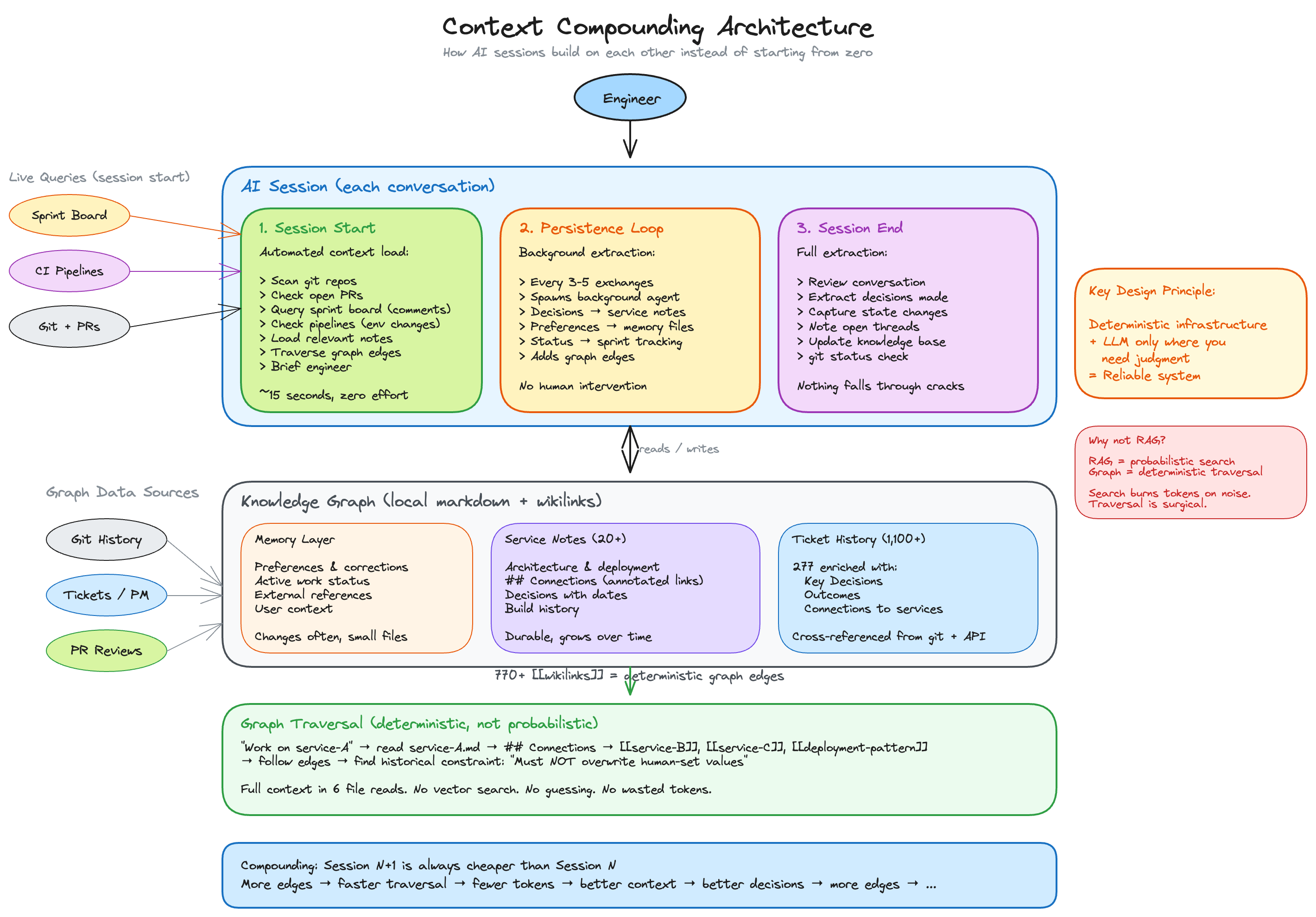
Click the diagram to enlarge it. Press X, Escape, or the dark background to return to the post.
The Problem: Stateless Sessions Are Expensive
Every LLM conversation starts from zero. That's fine for one-off questions. But engineering work is contextual — you're working on a service that depends on three others, was deployed a certain way for reasons documented in a PR review from 2023, and has constraints that only exist because of a production incident nobody wrote down properly.
When you start a new session, you have two options:
- Re-explain everything. Burn tokens, burn time, risk leaving something out.
- Don't explain, get worse output. The assistant hallucinates connections or misses constraints you assumed it would know.
Both waste time. The real solution is to make context persist between sessions — but not in a dump-everything-into-the-prompt way. You need the assistant to load relevant context, not all context.
The Architecture: Three Phases of Context Management
The system has three layers that work together across every session:
Phase 1: Session Start (automated context loading)
When I start a new session, before I say anything substantive, the system automatically:
- Scans git activity across all repos (recent commits, new branches)
- Checks open pull requests and their review status
- Queries the sprint board for my assigned tickets and surfaces any comments from the last 3 days that need a response — questions, decisions, blockers I might not have seen
- Checks for environment changes — if someone else deployed to a shared environment since my last session, I need to know before I assume my code is broken
- Loads relevant notes from the knowledge base (targeted by recency and relevance to the current directory)
- Detects stale information and fixes it silently (a PR that was "in review" last session but got merged today)
- Briefs me in 5-10 lines: what happened since last session, what needs attention, what's likely next
This takes about 30 seconds. In return, I never have to say "remember that PR I opened last week?" again. I never miss a comment on a ticket that was waiting for my input overnight. And I never spend 30 minutes debugging code only to discover someone else deployed to the same environment while I was at lunch.
Phase 2: Mid-Session Persistence (background extraction)
Every 3-5 substantive exchanges during a session, a background process captures what just happened:
- A design decision was made? → Written to the service note.
- A preference was expressed? → Saved as a feedback memory.
- A ticket status changed? → Sprint tracking updated.
- A new relationship between services discovered? → Edge added to the graph.
This happens without me asking. I don't type "remember this" — the system watches for patterns (decisions, corrections, status changes) and persists them automatically.
Phase 3: Session End (extraction and verification)
Before a session ends, the system reviews the full conversation and extracts:
- Decisions made (architecture, naming, tool choices)
- State changes (what moved from in-progress to done, what new work started)
- Open threads (what's unfinished and needs picking up next session)
It writes these to the knowledge base, updates the index, and runs git status on any touched repos to warn about uncommitted changes.
The Knowledge Graph: Traversal, Not Search
Here's the part that changed everything.
Most people's first instinct for "give the AI context" is RAG — retrieval-augmented generation. Embed your docs, do a similarity search, inject the top-K chunks. It works, kind of. But it's probabilistic. You're hoping the relevant chunks surface. And for engineering context — where relationships between things matter more than the things themselves — similarity search misses the point.
What I built instead is a graph of explicit relationships. Every service note in the knowledge base has a ## Connections section with annotated links:
## Connections

- [[ip-rotation-tool]] — dependency: provides pool of source IPs via WireGuard tunnels
- [[ami-deployment]] — deployment pattern: blue/green ASG, no containers
- [[threat-intel-graph]] — downstream: WHOIS data enriches graph database
- [[TICKET-2526]] — key decision: proxy was routing ALL traffic, breaking S3. Scoped to WHOIS only.
Each link has an annotation explaining the relationship, not just the existence. "Upstream data source", "deployment pattern", "consumer of this API", "incident that changed the architecture."
When I say "work on the domain lookup service", the system doesn't grep the codebase. It reads the service note, follows the edges to related services, follows those edges to find constraints and decisions, and loads relevant ticket history. Six file reads, full context, deterministic, zero wasted tokens.
RAG is search. This is traversal. Search burns tokens on noise. Traversal is surgical.
How the Graph Was Built: 15 Minutes, 8 Parallel Agents
The knowledge base existed before the graph — 20 service notes, scattered tickets, some tooling docs. But they were islands. No links between them. The assistant had to grep and guess.
To wire them up, I ran 8 agents in parallel. Each one:
- Took a batch of service notes
- Grepped git history for ticket IDs in commit messages
- Called the project management API for comments, resolutions, and key decisions on each ticket
- Wrote
## Connections,## Outcome, and## Key Decisionssections back to each note
277 tickets enriched. 770+ edges created. 15 minutes of wall-clock time. The graph went from sparse islands to a dense, navigable network in a single session.
The key insight: the information already existed — scattered across commit messages, PR reviews, and ticket comments from 2022-2024. The agents just collected it and made it traversable.
What This Actually Looks Like in Practice
Monday morning, new session:
Last session (Friday): Merged the GCL integration PR, fixed runner setup issues.
Jira: TICKET-3060 — John commented Friday 17:30: "should we use SSM or env vars for the endpoint?"
Open PRs: #12 (IAM trust policy, needs review), #370 (API server, needs review).
Likely next: respond to John's question, then chase reviews on the open PRs.
I didn't ask for this. It just knows. That Jira comment would have sat unread until I opened the board — maybe hours into my day, after I'd already started working in a direction that John's question might have changed.
Mid-session, working on a related service:
I start working on a service that consumes data from another team's API. The assistant follows the graph edge and finds a ticket from 8 months ago: "Must NOT overwrite categories set by human researchers." I didn't remember this constraint. It would have taken me an hour to discover it through normal channels — if I discovered it at all.
The compounding effect:
Session 1 is expensive — you're building the initial graph. Session 10 is noticeably cheaper — most context already exists. Session 50, the system knows more cross-cutting context than most individual engineers on the team, because it's collected decisions from every PR, every ticket comment, every architectural discussion.
Deterministic Code, Probabilistic Inference: Where to Draw the Line
Building this taught me something about LLM systems design that I think is underappreciated:
The best LLM systems minimize how much they depend on the LLM.
The graph structure is deterministic — markdown files with explicit links. The traversal is deterministic — follow edges, read files. The persistence rules are deterministic — "if a decision was made, write it here." The session-start scan is deterministic — git log, gh pr list, find by recency.
The LLM only enters where you actually need intelligence: deciding what's relevant to the current task, extracting decisions from natural language, summarizing a brief. Everywhere else, it's just code.
This is the pattern I keep seeing in reliable LLM systems: make the infrastructure deterministic, make the boundaries clear, use the model only where you need judgment. The more you can push into regular code, the more reliable the overall system becomes.
The Technical Stack
For anyone who wants to replicate this:
- Knowledge base: Obsidian (free, local-first, native wikilinks, graph view for visualization)
- AI assistant: Claude Code (CLI-based, supports custom skills/instructions, background agents)
- Memory layer: Markdown files with YAML frontmatter (loaded at session start)
- Graph edges:
[[wikilinks]]with annotations in## Connectionssections - Persistence rules: A ~200-line instruction file that defines when and where to save context
- External data sources: Git history, GitHub API (via
ghCLI), project management REST API (sprint board + comments)
The project management integration is important — it surfaces comments and decisions that happen asynchronously. Someone asks a question on your ticket at 5pm; the system catches it at 9am before you've started working in a direction that ignores their input.
Total setup time from scratch: half a day if you know what you want. A week of iteration if you're figuring out your workflow.
What I'd Do Differently
-
Start with connections earlier. I built the knowledge base first, then added links later. The graph should have been structural from day one — every note gets a Connections section immediately.
-
Be more aggressive about persistence. Early on, I only saved things when I explicitly asked. The background extraction loop was a later addition. It should have been there from the start — the cost of saving too much is near zero; the cost of losing a decision is re-discovery.
-
Don't over-index on note content. The edges matter more than the nodes. A service note with 3 lines but 8 well-annotated links is more valuable than a 200-line document with no connections.
Why This Matters Beyond My Setup
I built this for my own workflow, but the pattern is general. Anyone doing multi-session engineering work with an LLM assistant is losing context between sessions. The tools to fix it are straightforward: structured notes, explicit relationships, automated persistence, deterministic loading at session start.
The graph doesn't have to be in Obsidian. The persistence doesn't have to use Claude Code's background agents. The principle is what transfers: make context compound instead of evaporate.
Every session that writes one decision to the graph makes the next session cheaper. Over months, this compounds into something that feels less like "using an AI assistant" and more like working with a colleague who was in every meeting, read every PR, and never forgets why a decision was made.
That's the system I wanted. So I built it.